
Can anyone give me some clues about tdeio_uiserver? It appears to be a process forked but not execed from tdeinit.
I've looked at what I presume is the source but there's nothing obvious to me that would use any significant amount of RAM: https://git.trinitydesktop.org/cgit/tdelibs/tree/tdeio/misc/uiserver.cpp
The process seems to be growing without limit in TDE 14.1.5. I had not noticed such behavior in previous versions of TDE but I do use TDE very heavily and my workload changes over time.
My firefox is also very large but I can restart that to get back some RAM. Restarting firefox does not reduce the size of tdeio_uiserver.
Is there a signal I can send to tdeio_uiserver to tell it to downsize?
I could of course reboot, or logout and login, but that costs me about twenty minutes including putting dozens of firefox windows back where they're supposed to be.
Thanks,
--Mike
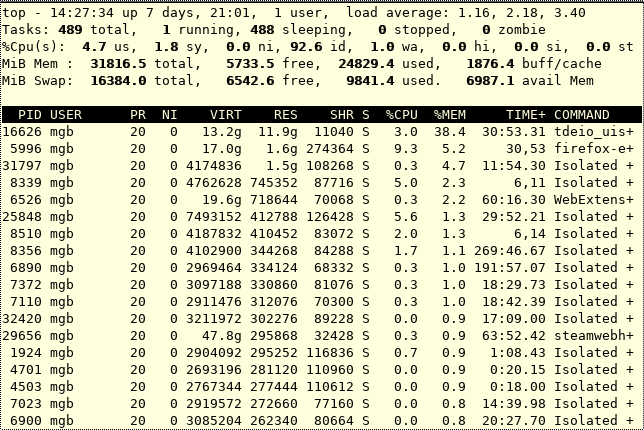
Attached: Screenshot of "top" sorted by "RES" column.

On Saturday 07 March 2026 14:44:05 Mike Bird via tde-users wrote:
Can anyone give me some clues about tdeio_uiserver? It appears to be a process forked but not execed from tdeinit.
I've looked at what I presume is the source but there's nothing obvious to me that would use any significant amount of RAM: https://git.trinitydesktop.org/cgit/tdelibs/tree/tdeio/misc/uiserver.cpp
The process seems to be growing without limit in TDE 14.1.5. I had not noticed such behavior in previous versions of TDE but I do use TDE very heavily and my workload changes over time.
My firefox is also very large but I can restart that to get back some RAM. Restarting firefox does not reduce the size of tdeio_uiserver.
Is there a signal I can send to tdeio_uiserver to tell it to downsize?
I could of course reboot, or logout and login, but that costs me about twenty minutes including putting dozens of firefox windows back where they're supposed to be.
Thanks,
--Mike
Attached: Screenshot of "top" sorted by "RES" column.
If you don't already use it, download and run htop. It often gives me more info about rogue processes that don't seem to make sense in top.
For example, I find that I can kill background processes that don't show up in top, but show up in htop, then the problem child suddenly disappears. One has to use some caution, as you might end up shutting down or freezing your system (happened to me once), but I think you probably know more than I about what not to touch among running processes.
Bill
On Sat March 7 2026 17:28:06 William Morder via tde-users wrote:
If you don't already use it, download and run htop. It often gives me more info about rogue processes that don't seem to make sense in top.
Hi Bill,
There's more detail in htop but in this case I don't see any new clues.
--Mike
On Saturday 07 March 2026 18:12:11 Mike Bird via tde-users wrote:
On Sat March 7 2026 17:28:06 William Morder via tde-users wrote:
If you don't already use it, download and run htop. It often gives me more info about rogue processes that don't seem to make sense in top.
Hi Bill,
There's more detail in htop but in this case I don't see any new clues.
--Mike
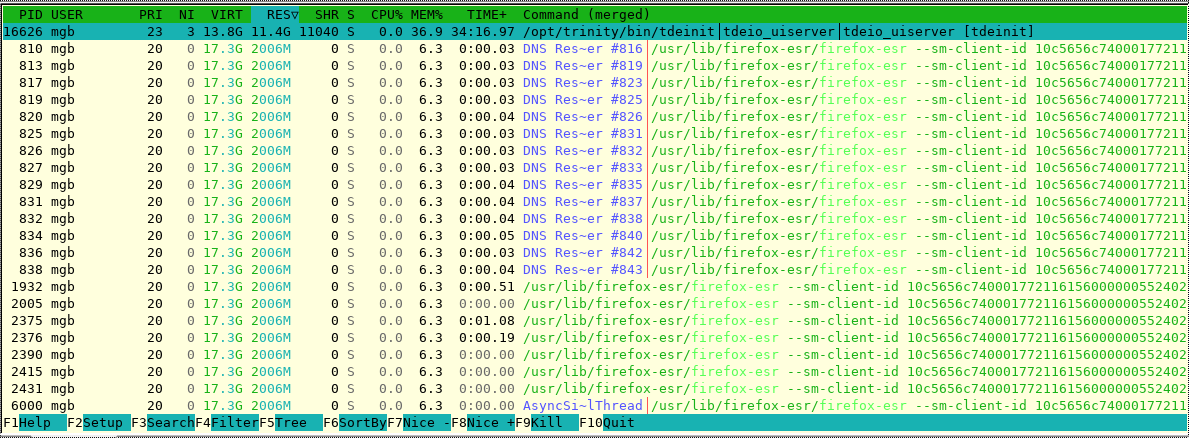
I realize that everybody uses their machines differently, so their top and htop will probably not look like mine ... but it looks like firefox is swallowing up resources. That seems odd to me.
Attached please find snapshots of my own top and htop for comparison. It may be that you have different settings, which affect what is shown.
Just my own instinct or hunch here, not quite a guess.
Bill


Mike Bird via tde-users wrote:
On Sat March 7 2026 17:28:06 William Morder via tde-users wrote:
If you don't already use it, download and run htop. It often gives me more info about rogue processes that don't seem to make sense in top.
Hi Bill,
There's more detail in htop but in this case I don't see any new clues.
--Mike
PID %CPU %MEM VSZ RSS TTY STAT START TIME COMMAND 2627 0.0 1.5 358548 318192 ? S Feb27 0:25 tdeio_uiserver [tdeinit]
I have 20GB of memory and IMO the tdeio_uiserver has nothing to do with firefox, because firefox uses most of the memory 3041 76.3 14.1 17393804 2846188 ? Sl Feb27 9789:16 _ /opt/custom_x64/firefox-147.0.3/firefox --sm-client-id 10dae8df69000177155053500000026000123
As Slavek said, try killing the process and see what happens. I don't even remember what this uiserver is doing.
As of debugging one could use gdbg and attach the process if you have debugging compiled or strace and see what it is doing ... but it is painful to read it.

On Saturday 07 of March 2026 23:44:05 Mike Bird via tde-users wrote:
Can anyone give me some clues about tdeio_uiserver? It appears to be a process forked but not execed from tdeinit.
I've looked at what I presume is the source but there's nothing obvious to me that would use any significant amount of RAM:
https://git.trinitydesktop.org/cgit/tdelibs/tree/tdeio/misc/uiserver.cpp
The process seems to be growing without limit in TDE 14.1.5. I had not noticed such behavior in previous versions of TDE but I do use TDE very heavily and my workload changes over time.
My firefox is also very large but I can restart that to get back some RAM. Restarting firefox does not reduce the size of tdeio_uiserver.
Is there a signal I can send to tdeio_uiserver to tell it to downsize?
I could of course reboot, or logout and login, but that costs me about twenty minutes including putting dozens of firefox windows back where they're supposed to be.
Thanks,
--Mike
Attached: Screenshot of "top" sorted by "RES" column.
Hi Mike,
I can confirm that in a few cases I have also observed high memory consumption in tdeio_uiserver. For now I have not put more effort into investigating the cause. I simply killed the process because a new instance is started as soon as needed.
Cheers Slávek --
On Sun March 8 2026 04:07:46 Slávek Banko via tde-users wrote:
I can confirm that in a few cases I have also observed high memory consumption in tdeio_uiserver. For now I have not put more effort into investigating the cause. I simply killed the process because a new instance is started as soon as needed.
Thank you Slávek. That is exactly what I was hoping to hear.
--Mike

On 2026/03/08 07:44 AM, Mike Bird via tde-users wrote:
Can anyone give me some clues about tdeio_uiserver? It appears to be a process forked but not execed from tdeinit.
I've looked at what I presume is the source but there's nothing obvious to me that would use any significant amount of RAM: https://git.trinitydesktop.org/cgit/tdelibs/tree/tdeio/misc/uiserver.cpp
The process seems to be growing without limit in TDE 14.1.5. I had not noticed such behavior in previous versions of TDE but I do use TDE very heavily and my workload changes over time.
My firefox is also very large but I can restart that to get back some RAM. Restarting firefox does not reduce the size of tdeio_uiserver.
Is there a signal I can send to tdeio_uiserver to tell it to downsize?
I could of course reboot, or logout and login, but that costs me about twenty minutes including putting dozens of firefox windows back where they're supposed to be.
Hi Mike,
I think it is used by Konqueror to show the transfer progress when copying files. You can try copy a large amount of files from a remote server and monitor htop to see if the memory usage increases during the copy operation.
Cheers Michele
-
 deloptes
 -
 Michele Calgaro
 -
 Mike Bird
 -
 Slávek Banko
 -
 William Morder