
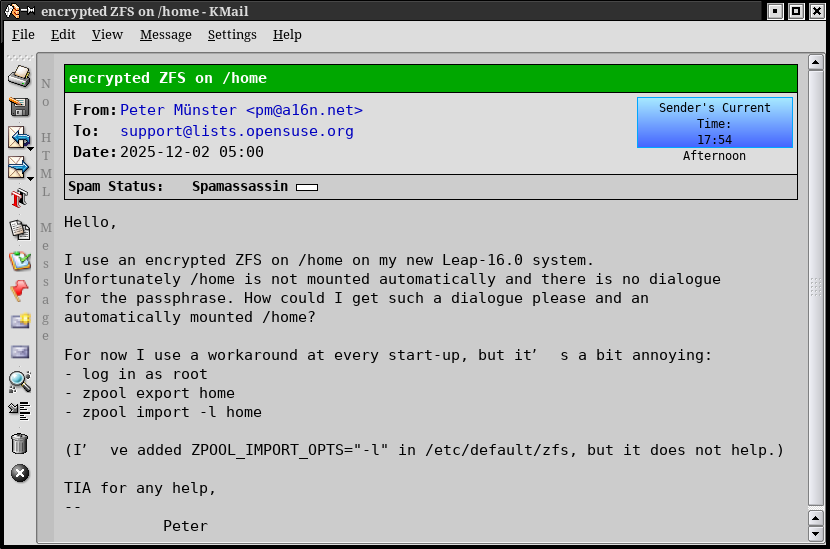
Lately I've been seeing this weird spacing effect with apostrophes in incoming emails. The encoding for the messages in question is "auto-detected" by Kmail as UTF-8, and in the message headers announce that they are UTF-8.
Is this some artifact of the sending agent, or something that Kmail is doing?
I attach an example.
Leslie

On Tue December 2 2025 09:02:19 Leslie Turriff via tde-users wrote:
Lately I've been seeing this weird spacing effect with apostrophes in incoming emails. The encoding for the messages in question is "auto-detected" by Kmail as UTF-8, and in the message headers announce that they are UTF-8.
Is this some artifact of the sending agent, or something that Kmail is doing?
I attach an example.
You can press the V key to see the source of the email and thereby determine whether the weird spaces were sent to you or added by kmail.
--Mike
On Tuesday 02 December 2025 11:11:05 Mike Bird via tde-users wrote:
On Tue December 2 2025 09:02:19 Leslie Turriff via tde-users wrote:
Lately I've been seeing this weird spacing effect with apostrophes in incoming emails. The encoding for the messages in question is "auto-detected" by Kmail as UTF-8, and in the message headers announce that they are UTF-8.
Is this some artifact of the sending agent, or something that Kmail is doing?
I attach an example.
You can press the V key to see the source of the email and thereby determine whether the weird spaces were sent to you or added by kmail.
I guess you didn't look at the attachments; but since I don't know what all that stuff means, it doesn't do me too much good, thus my question.
Leslie
On Tue December 2 2025 18:16:52 Leslie Turriff via tde-users wrote:
I guess you didn't look at the attachments; but since I don't know what all that stuff means, it doesn't do me too much good, thus my question.
Hi Leslie,
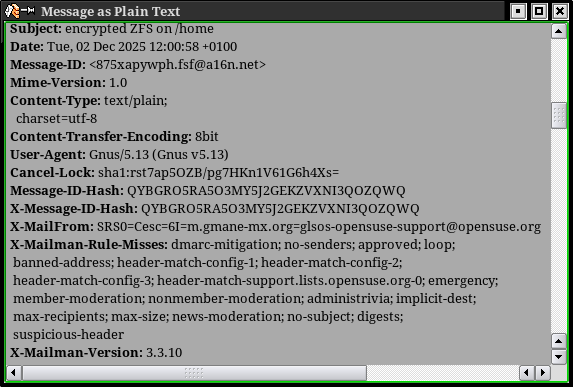
The attachments showed (1) how the message was formatted and (2) some of the headers. If you press the V key and scroll down you should, unless it is compressed or encrypted, see what was actually received.
--Mike
On Tuesday 02 December 2025 20:46:12 Mike Bird via tde-users wrote:
On Tue December 2 2025 18:16:52 Leslie Turriff via tde-users wrote:
I guess you didn't look at the attachments; but since I don't know what all that stuff means, it doesn't do me too much good, thus my question.
Hi Leslie,
The attachments showed (1) how the message was formatted and (2) some of the headers. If you press the V key and scroll down you should, unless it is compressed or encrypted, see what was actually received.
--Mike
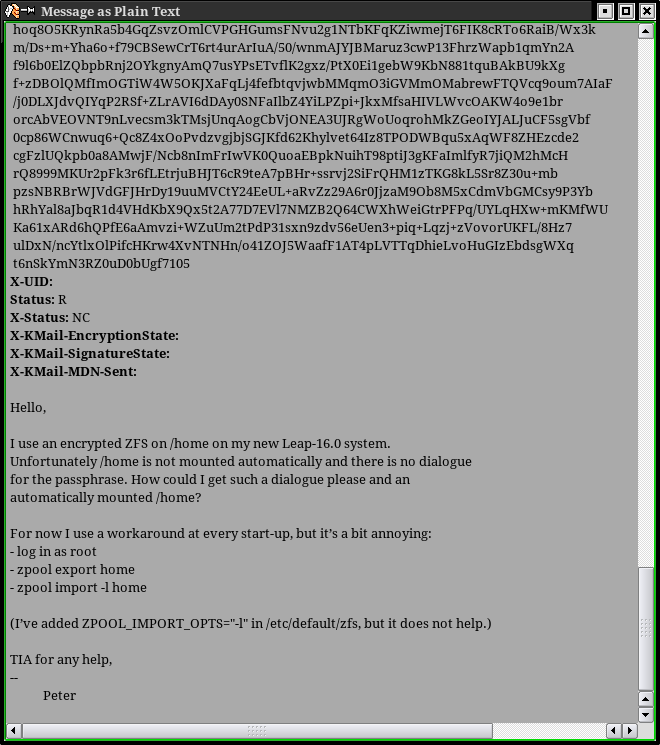
Ah, you mean this (attached), which I didn't notice follows a giant block of encrypted ?. Judging by the text at the end of the message, the problem seems to be Kmail?
Leslie
On Tue December 2 2025 21:56:39 Leslie Turriff via tde-users wrote:
Ah, you mean this (attached), which I didn't notice follows a giant block of encrypted ?. Judging by the text at the end of the message, the problem seems to be Kmail?
Yep. That shows that the email was correctly formatted when it arrived and something - presumably in kmail - added the white space after the apostrophes.
Are you comfortable on the command line? Can you copy paste a small piece of text from the plain text version of your email (not the text below) into a command such as:
$ echo "but it's a bit" | od -c 0000000 b u t i t ' s a b i t \n 0000017 $
If apostrophe in the email is a fancy utf-8 apostrophe you may get a different result than that shown above from a regular single quote.
Also your kmail message body font and locale might be of interest.
--Mike
On Wednesday 03 December 2025 00:37:12 Mike Bird via tde-users wrote:
On Tue December 2 2025 21:56:39 Leslie Turriff via tde-users wrote:
Ah, you mean this (attached), which I didn't notice follows a giant block of encrypted ?. Judging by the text at the end of the message, the problem seems to be Kmail?
Yep. That shows that the email was correctly formatted when it arrived and something - presumably in kmail - added the white space after the apostrophes.
Are you comfortable on the command line? Can you copy paste a small piece of text from the plain text version of your email (not the text below) into a command such as:
$ echo "but it's a bit" | od -c 0000000 b u t i t ' s a b i t \n 0000017 $
If apostrophe in the email is a fancy utf-8 apostrophe you may get a different result than that shown above from a regular single quote.
Also your kmail message body font and locale might be of interest.
--Mike ____________________________________________________ tde-users mailing list -- users@trinitydesktop.org To unsubscribe send an email to users-leave@trinitydesktop.org Web mail archive available at https://mail.trinitydesktop.org/mailman3/hyperkitty/list/users@trinitydeskt op.org
Aha! @00:50:38 leslie@pinto wd=/home/leslie $ echo "For now I use a workaround at every start-up, but it’s a bit annoying:"|od -c 0000000 F o r n o w I u s e a 0000020 w o r k a r o u n d a t e v 0000040 e r y s t a r t - u p , b u 0000060 t i t 342 200 231 s a b i t a 0000100 n n o y i n g : \n 0000111 rc=0
So it's not Kmail, it's some weird mail software on the other side. This is a bit strange as the message was posted on a Linux mailing list, so most likely originated as UTF-8? Perhaps, though, it was mangled by some intermediate non-Linux server?
Leslie
On Tue December 2 2025 22:55:17 Leslie Turriff via tde-users wrote:
So it's not Kmail, it's some weird mail software on the other side. This is a bit strange as the message was posted on a Linux mailing list, so most likely originated as UTF-8? Perhaps, though, it was mangled by some intermediate non-Linux server?
SMTP servers don't mangle mail except to add headers at the beginning.
The text was probably copy-pasted from a word-processor that auto-corrected ASCII single quote to a unicode right single quotation mark:
https://codepoints.net/U+2019?lang=en
Nevertheless that character displays correctly in my KMail.
If you want to pursue this further please screenshot your Settings / Configure KMail / Appearance / Fonts / Message Body.
--Mike
On Wednesday 03 December 2025 01:36:37 Mike Bird via tde-users wrote:
On Tue December 2 2025 22:55:17 Leslie Turriff via tde-users wrote:
So it's not Kmail, it's some weird mail software on the other side. This is a bit strange as the message was posted on a Linux mailing list, so most likely originated as UTF-8? Perhaps, though, it was mangled by some intermediate non-Linux server?
SMTP servers don't mangle mail except to add headers at the beginning.
The text was probably copy-pasted from a word-processor that auto-corrected ASCII single quote to a unicode right single quotation mark:
https://codepoints.net/U+2019?lang=en
Nevertheless that character displays correctly in my KMail.
If you want to pursue this further please screenshot your Settings / Configure KMail / Appearance / Fonts / Message Body.
--Mike ____________________________________________________ tde-users mailing list -- users@trinitydesktop.org To unsubscribe send an email to users-leave@trinitydesktop.org Web mail archive available at https://mail.trinitydesktop.org/mailman3/hyperkitty/list/users@trinitydeskt op.org
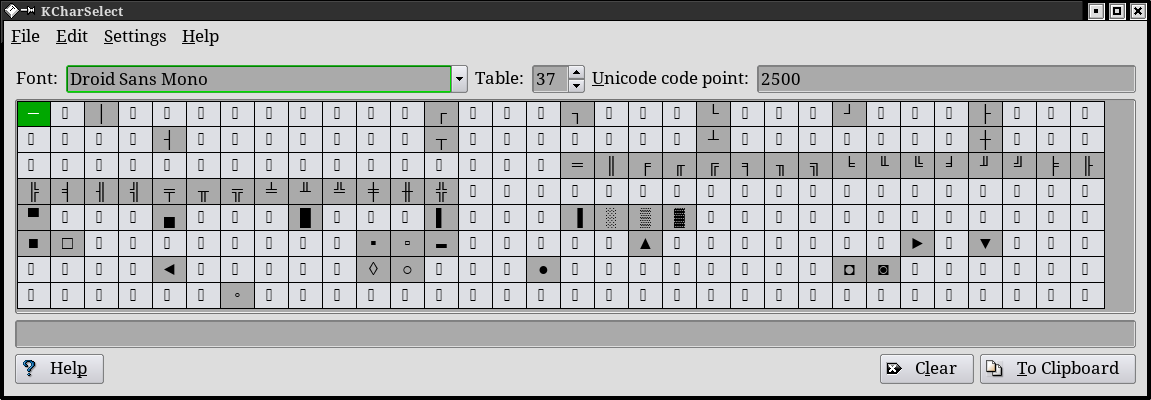
Okay, now I understand what's happened. I had changed my Message Body font from Droid Serif to DejaVu Sans Mono because I got tired of having to switch fonts to view plaintext posts with imbedded terminal output. (I generally prefer using DejaVu Sans Mono to Droid Sans Mono because it supports more special characters*, but clearly it's not appropriate for use in viewing Kmail messages. I have switched to Droid Sans Mono, which does not produce the weirdness.
Leslie
*See attached.

-
 Leslie Turriff
 -
 Mike Bird