
Once in a while, Kicker stops working. (See attached Klicker1.png; I place my panels on the left and right side of the screen.) Thinking that it had crashed, I tried to restart it (See Klicker2.png), but it's still running, as I realized, seeing that the applets still appear in the main panel.
Can I just kill and restart it from the command line?
Leslie

On 2025-11-09 03:06:11 Thierry de Coulon via tde-users wrote:
On Sunday 09 November 2025 05:41:00 Leslie Turriff via tde-users wrote:
Once in a while, Kicker stops working. (...) Can I just kill and restart it from the command line?
Leslie
Just tried. It worked
Thierry
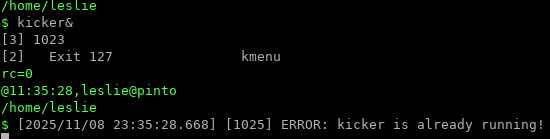
I tried it also, and it restarted partially, but was still non-functional. I shut down my active applications and switched to the Linux console to reboot, and after logging back in it was working again.
Leslie


On 2025-11-09 03:53:28 deloptes via tde-users wrote:
Leslie Turriff via tde-users wrote:
I tried it also, and it restarted partially, but was still non-functional. I shut down my active applications and switched to the Linux console to reboot, and after logging back in it was working again.
may be the issue was with kdesktop?
Maybe? The symptom is that all of the applications (but not the applets) disappear from my panels, and the pop-up menu for logging off, and the ability to switch screens via the mouse wheel disappear / become unavailable.
Leslie
-
 deloptes
 -
 Leslie Turriff
 -
 Thierry de Coulon