
Hello everybody!
I have only recently tried streaming some online television channels using VLC, due to my discovering a couple of YUGE playlists on github.
When I first loaded the playlists and started up VLC, it took a little finagling, but within 15 minutes or so I was watching public television stations (US). Then I got the bright idea to combine several of the playlists into one big playlist; same great results. I was immediately able to watch television channels from all over the planet (if they weren't geo-blocked).
The only problem was that it sounded hollow, shrill and ugly, like my speakers were inside a tin can. So I made a few more adjustments, and everything was fine. More great stuff that I was discovering. Now, I am not crazy about the idea of watching television, as I don't have one any more, haven't missed it in these past few years, been reading a lot more books, and my life tends to go better without television. Still, every once in a while, I wonder what's on, if I actually had a television to watch. And besides, I can stop any time I want....
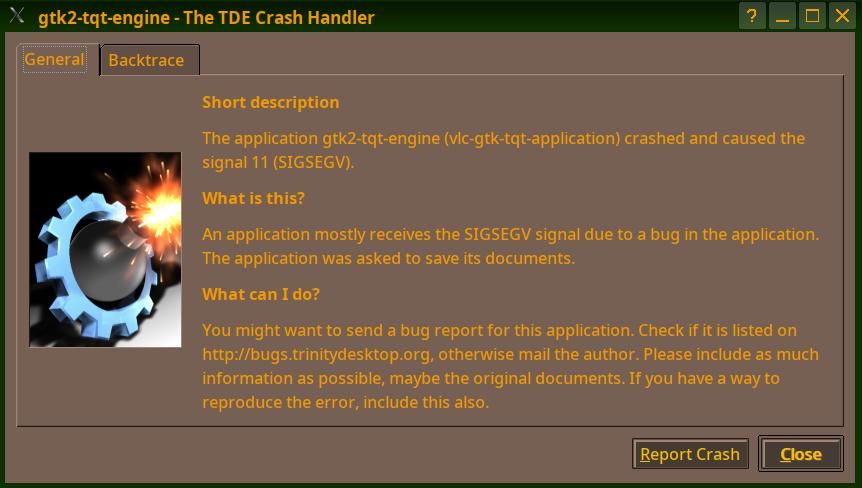
Somehow, though, don't know what happened, VLC started crashing, and now won't start up properly. Attached is a snapshot of the notification window: gtk2-tqt-engine (vlc-gtk-tqt application) seems to be the cause. I did a search of the list, as I remembered something like that (related to Open Office), and Nik advised that I remove these packages:
gtk3-tqt-engine-trinity gtk2-engines-gtk-qt-trinity
Slavek said it was probably the kgtk-qt3-trinity package.
In any case, my result now is the same as back then (in February of 2022): "Package 'gtk3-tqt-engine-trinity' is not installed, so not removed"; the same with kgtk-qt3-trinity.
If anybody has a clue how to resolve this issue, it would be a great help. As I said above, everything worked just fine without much fuss: thousands of channels, everything playing just like regular television. My only changes (so far as I recall) were to adjust the sound, equalizer, etc. Then it stopped working, and now just crashes immediately after starting.
Thanks for any help ...
Bill
P.S. See attachment. Also, here are some links, if anybody else is curious to try for themselves:
https://news.ycombinator.com/item?id=40198326
https://github.com/iptv-org/iptv https://github.com/iptv-org/iptv/blob/master/PLAYLISTS.md
https://iptv-org.github.io/iptv/index.m3u https://2-fss-2.streamhoster.com/pl_138/amlst:201814-1291584/playlist.m3u8
https://github.com/Free-TV/IPTV https://raw.githubusercontent.com/Free-TV/IPTV/master/playlist.m3u8
https://github.com/iptv-org/awesome-iptv https://github.com/iptv-org/database

said William Morder via tde-users:
| I have only recently tried streaming some online television channels | using VLC, due to my discovering a couple of YUGE playlists on github.
Can't solve your VLC issue, but I can highly recommend a proper application devoted to that purpose. It is IPTVnator:
https://github.com/4gray/iptvnator
I built two homemade television sets using it, the iptv-org playlists and some others, and Debian running on Raspberry Pi machines. Those are the only televisions I currently own. I have it, too, on my desktop machine running TDE, so I know they're happy together. (Navigate to what you want, click to watch it, double click on the program to make it full screen; esc will return you to the video with the guide on the side.) I've used both the regular application and the appimage; you might try the latter to see if you like it.) It can use VLC as its player, but I'm content with the built-in one, which is javascript.
On Wednesday 29 July 2026 19:04:55 dep via tde-users wrote:
said William Morder via tde-users: | I have only recently tried streaming some online television channels | using VLC, due to my discovering a couple of YUGE playlists on github.
Can't solve your VLC issue, but I can highly recommend a proper application devoted to that purpose. It is IPTVnator:
https://github.com/4gray/iptvnator
I built two homemade television sets using it, the iptv-org playlists and some others, and Debian running on Raspberry Pi machines.
My curiosity has been piqued. Do you use an external hdmi monitor, or some such setup? I sometimes find old cabinets, and think of putting in a monitor, running from a Raspberry Pi, etc.
Also, I may have some other uses for a R Pi in the future, so now is maybe my opportunity to learn. More on that later.
Those are the only televisions I currently own. I have it, too, on my desktop machine running TDE, so I know they're happy together. (Navigate to what you want, click to watch it, double click on the program to make it full screen; esc will return you to the video with the guide on the side.) I've used both the regular application and the appimage; you might try the latter to see if you like it.) It can use VLC as its player, but I'm content with the built-in one, which is javascript.
Okay, downloaded the deb package, installed, got it up and running. It accepts my playlist just fine (and I like the fact that it takes m3u8 playlists, because they are just plain text).
Only one problem, and it's kinda a big one: NO SOUND, nor any way that I can find to enable it, increase it, etc. I did look under the hood for the controls, tried increasing volume, but nothing happens. I don't suppose this is one of those things that uses pulseaudio and won't take alsa? That's a deal breaker for me, as pulseaudio always, always, always messes up my settings, so I either purge everything to do with it, or at least disable all its evil spawn. Maybe there is some way to get it to use alsa?
Also, I tried to find some kind of preferences, settings, etc., comparable to VLC, and nothing doing.
It works, I'll give it that; whereas VLC is still crashing on me. But it's a little simpler than I would like where I want equalizers, spatializers, dolby, all that stuff.
Also I would rather not use javascript for streaming, if (for example) I should find a way to use it over a proxy. Maybe I am too picky.
Well, whatever I can get to work would be nice: vlc, this iptvnator, anything else that is recommended. Since I already know VLC (and have my settings already configured from previous installations), I would prefer to use that.
If anybody can help to get me going with VLC, or this or any other decent iptv streaming program, I would be most grateful.
Bill
said William Morder via tde-users: | On Wednesday 29 July 2026 19:04:55 dep via tde-users wrote: | > said William Morder via tde-users: | > | I have only recently tried streaming some online television channels | > | using VLC, due to my discovering a couple of YUGE playlists on | > | github. | > | > Can't solve your VLC issue, but I can highly recommend a proper | > application devoted to that purpose. It is IPTVnator: | > | > https://github.com/4gray/iptvnator | > | > I built two homemade television sets using it, the iptv-org playlists | > and some others, and Debian running on Raspberry Pi machines. | | My curiosity has been piqued. Do you use an external hdmi monitor, or | some such setup? I sometimes find old cabinets, and think of putting in | a monitor, running from a Raspberry Pi, etc.
I have three machines other than my desktop machine that run it.
One is a TCL Roku television. I read the [lack of]privacy agreement and took away its internet privileges. I built the Raspberry Pi 5 box, which I have feeding an Onkyo receiver via HDMI. The receiver is attached to the television, also via HDMI.
The second is a 32-inch ONN computer monitor with a soundbar. Here, it's internet from Starlink, to a Raspberry Pi 5 via wifi or, now, cat6 cable. Video goes to the monitor via HDMI, while audio goes to the soundbar via sp/dif optical connection (USB-DAC from Raspberry; then to soundbar from the DAC).
| Also, I may have some other uses for a R Pi in the future, so now is | maybe my opportunity to learn. More on that later.
Here: https://ofb.biz/safari/article/1252.html
| Okay, downloaded the deb package, installed, got it up and running. It | accepts my playlist just fine (and I like the fact that it takes m3u8 | playlists, because they are just plain text). | | Only one problem, and it's kinda a big one: NO SOUND, nor any way that I | can find to enable it, increase it, etc. I did look under the hood for | the controls, tried increasing volume, but nothing happens. I don't | suppose this is one of those things that uses pulseaudio and won't take | alsa? That's a deal breaker for me, as pulseaudio always, always, always | messes up my settings, so I either purge everything to do with it, or at | least disable all its evil spawn. Maybe there is some way to get it to | use alsa?
There are no audio controls in IPTVnator, nor video controls beyond a mute switch. You handle those with your computer as you would any other application.
| Also, I tried to find some kind of preferences, settings, etc., | comparable to VLC, and nothing doing.
Nope. Though if you want, in the settings you can set it to use VLC instead of the built-in player. I played with it once, saw no point, and went back to the built-in one.
| It works, I'll give it that; whereas VLC is still crashing on me. But | it's a little simpler than I would like where I want equalizers, | spatializers, dolby, all that stuff.
You do that in your computer. If you like oodles of complication, you want Kodi. Which I hate with a blind passion. https://kodi.tv/
At least it is said that Kodi can be made to work. This in my experience pretty much can't: https://plasma-bigscreen.org/
| Also I would rather not use javascript for streaming, if (for example) I | should find a way to use it over a proxy. Maybe I am too picky.
Well, you might be able to get Hypnotix to work. After some fiddling I was able to get it, but while it starts it won't play any channels. Also, it is probably overly simple for toyr tastes. It was all the rage in the Linux press a couple of years ago. Don't hear much about it now. https://github.com/linuxmint/hypnotix
| Well, whatever I can get to work would be nice: vlc, this iptvnator, | anything else that is recommended. Since I already know VLC (and have my | settings already configured from previous installations), I would prefer | to use that. | | If anybody can help to get me going with VLC, or this or any other | decent iptv streaming program, I would be most grateful. | | Bill | ____________________________________________________ | tde-users mailing list -- users@trinitydesktop.org | To unsubscribe send an email to users-leave@trinitydesktop.org | Web mail archive available at | https://mail.trinitydesktop.org/mailman3/hyperkitty/list/users@trinityde |sktop.org
On Thursday 30 July 2026 07:51:08 dep via tde-users wrote:
Well, you might be able to get Hypnotix to work. After some fiddling I was able to get it, but while it starts it won't play any channels. Also, it is probably overly simple for toyr tastes. It was all the rage in the Linux press a couple of years ago. Don't hear much about it now. https://github.com/linuxmint/hypnotix
Well, I did manage to get VLC working adequately, after all; so from a purely practical point of view, my issue is resolved.
I ought to say that I haven't used VLC it at least five years. It works well enough, but for playing actual video files from my machine, I prefer smplayer. And since I've hardly ever tried streaming videos, I haven't needed anything else. And I can't stand commercials, advertisements, nor even PBS pledge drives. If I want to watch something from YT, I use yt-dlp and download the video to my machine, the use smplayer to watch it.
When I saw all the channels available on these playlists, temptation took hold of me. But I can stop anytime I want.
After fiddling with both IPTVnator and VLC, I remembered that this had happened to me before, years ago, but that I still had my old configuration files for VLC buried away somewhere. So I made a backup of my current settings, just in case, then did some overwriting, replacing the existing configuration with the old config files ... and presto! VLC works again.
There is still the unsolved riddle of why VLC was crashing, and why it's somehow connected to gtk2 and/or tqt, or whatever. Now when I start up VLC and try to play a channel, I get a window saying that it cannot play. Then I go into settings > audio > and set my audio device:
HD audio generic, ALC257 Analog Hardware device with all software conversions
and it works again. I tried changing this to my default setting in the config, but somehow VLC or something keeps resetting it to Default, whereas I want my default to be that preferred setting. I will go into the configuration to see if I can make it permanent. But for now, it is a puzzle.
I do remember that I had the problem before, when I used VLC years ago (before 2021 or so), and it's why I switched to smplayer for playing actual video files.
Regarding my alleged "taste" for complexity: this is not so. Sometimes I want things just as simple as can be; for example, I want a text editor that is just a text editor and nothing else, so I still use an old leafpad package from Devuan/Debian Jessie, because it requires no dependencies, and still works. I don't need markup, don't do coding, etc. I just want a simple text editor.
Also, I like to keep my online and offline programs and activities separate; my own habit of a kind of sandboxing. For example, I use qmmp online for streaming radio, but use audacious for playing music files from my machine. Same thing here; I'd rather keep smplayer for my offline player, and VLC for online video streaming.
Also, both smplayer and VLC accept my TDE color scheme, whereas most others don't.
For video, however, and especially for sound, I care more about quality, so I want to be able to shape it until it looks and sounds right. I might try using IPTVnator with VLC as my player; it did give it a go last night, but I was still wrestling with VLC configuration, and it wasn't working any better like that. Or I might try Hypnotix. But for now, I got VLC working well enough, so it's no longer an issue, just a puzzle why this keeps happening.
The first couple times I run VLC, it's just fine, then it starts crashing, that gtk2-tqt issue, then I remember to overwrite the config file, then it works. Now, as I said, I get this notification window that says it cannot play my sound, and I have to go into the audio settings ... every single time.
So now it is really just a matter of how to make my VLC configuration settings permanent.
Thanks to dep and Nik for help. I would still like to get to the root of that issue, but now it is more just to satisfy my own curiosity.
Bill

Hi Bill!
Anno domini 2026 Wed, 29 Jul 16:43:26 -0700 William Morder via tde-users scripsit:
[...]
gtk3-tqt-engine-trinity gtk2-engines-gtk-qt-trinity
Slavek said it was probably the kgtk-qt3-trinity package.
In any case, my result now is the same as back then (in February of 2022): "Package 'gtk3-tqt-engine-trinity' is not installed, so not removed"; the same with kgtk-qt3-trinity.
Did you chaeck if "gtk2-engines-gtk-qt-trinity" is still instaled? If so, remove it and restart your session.
Nik
Thanks for any help ...
Bill

William Morder via tde-users wrote:
If anybody has a clue how to resolve this issue, it would be a great help. As I said above, everything worked just fine without much fuss: thousands of channels, everything playing just like regular television. My only changes (so far as I recall) were to adjust the sound, equalizer, etc. Then it stopped working, and now just crashes immediately after starting.
Thanks for any help ...
Isn't kmplayer or kplayer able to do the same? Why VLC?
On Monday 10 August 2026 03:54:10 deloptes via tde-users wrote:
William Morder via tde-users wrote:
If anybody has a clue how to resolve this issue, it would be a great help. As I said above, everything worked just fine without much fuss: thousands of channels, everything playing just like regular television. My only changes (so far as I recall) were to adjust the sound, equalizer, etc. Then it stopped working, and now just crashes immediately after starting.
Thanks for any help ...
Isn't kmplayer or kplayer able to do the same? Why VLC?
You are late getting to the party. Not much left to say; or maybe there is? As I mentioned earlier, I managed to find an old config file buried away, then I overwrote my existing config file, and now VLC plays well enough. I am still making fine adjustments, but at least it plays.
My problem now is that streaming live TV tends to interfere with my connection in general, so that when VLC stutters or pauses, my whole machine comes to a halt, sometimes for an hour or more. Streaming television doesn't work and play well with anything else. But I think this is partly due to my network itself, over which I have no control, as it is the house wifi. And if too many others are also streaming video, internet here becomes almost totally unusable. Anyway, I don't need much television; even now that I have figured out how to stream television using those IPTV playlists from github, television doesn't hold much charm for me. Same old shows as they were playing a few years ago. Ever since the pandemic and lockdown, not much in the way of new shows have come out. And I get most of my news either from actual radio, or from online radio, or from various news feeds like ycombinator, etc., and have a few sites that I visit online sometimes. News is pretty depressing, too, so it's not like I care much about it.
In any case, streaming online television is just good enough, so that I don't have to think about buying an actual television sometime in the future. My old television died, and I haven't wanted to buy a new one, and don't want something that connects to internet that I cannot control. At least with this, I can have some control.
For any long-term use, though, or if I ever have guests who might want to watch television, I believe that I will find a Raspberry Pi, and use that exclusively for streaming television, or maybe a few other similar activities; so that I can keep that box separate from my laptop, desktop, or whatever I might actually be working on in some imagined future. For now, however, I would rather spend my time reading actual books, and listening to music. Streaming radio takes up only 10-20 kbps, whereas streaming television or video from online sources takes up a lot more, probably in the mbps range. I have a couple old monitors, as well as an old television that is just new enough, and unused enough, that it would work well with a Rasp Pi. (It has hdmi connections, usb connections, etc., and pretty good screen size and resolution, but it doesn't need to connect to internet in order to function.
All that remains is my question of why it was something with tqt that (according to the notification) was making VLC crash. I mean, it worked okay at first, then started crashing. Somewhere in my config file, there is probably a detail that would provide some clues about why. But for now, it works, and I don't use it too much, so it doesn't matter much.
Regarding TDE's video players: frankly, TDE's sound and video players tend to be less than adequate for my needs. Out of all that TDE has to offer, I can only think of soundkonverter-trinity that I actually use: which, indeed, has some features that make it better than the alternatives. First among those are its customizable personal settings; so that I can create profiles for converting to mp3 or flac, with precise settings for bitrate, gain, its "lossiness" and so on. Then I don't have to do it again and again every time, but can just load one of my settings and I am done.
I have not made a close comparison of VLC with others video players. I did try out kmplayer and kplayer, but they are much too primitive for my own purposes. I do use smplayer for playing actual video files from my own machine, and my understanding is that smplayer and kmplayer are both built on mplayer, but I don't like mplayer as my front-end, even if smplayer just runs on top of it.
With a "few" hours of "tweaking" my settings, VLC can be wrestled into shape. (I mean *tweaking* in the old music-technical sense, as I hear that the word now means something different to some people; but I am not one of them.) I manage to get pretty good sound out of some very CHEAP Logitech multimedia speakers ($30 or so, about five years old now, with some internal re-wirinng), because I can dig into VLC and make all kinds of fine adjustments ("tweaking") that I cannot do with any of the other multimedia players, whether they are TDE or other. It still doesn't sound quite so good as smplayer does for films and videos, or like audacious (for local files) or qmmp (for online radio), but that will take more time. I have got VLC adjusted to the point where it is listenable, which the others are not, at least not for my purposes. When I try to play online television with other players, the sound is tinny, hollow, shrill, too much treble and no middle or bass, etc. But VLC has internal equalisation, and many other features, so that I get pretty good sound out of really cheap speakers.
There may be other players that work even better, but for my own situation, at least, VLC stands far above the rest. Also, I use it on my phone, but only to play music there. Other video players don't even come close.
It would be nice if TDE came out with something comparable, as for my machines at home I want to stay with TDE. That's what I intend to put on my Raspberry Pi, whenever I get one, then to play television on a monitor from that. But for the present, VLC works best, even if it takes a bit of work to get it playing like I want, and it also accepts my TDE color scheme. If there were some kind of vlc-trinity package, that would be just about perfect, but obviously that can't happen.
I do still wonder about why my "original" or default settings for VLC worked at first, then didn't work, when all I changed was the settings for sound. But after I overwrote the configuration with an old config file that I found, everything works again.
TDE is a great desktop, with great software, at least for some purposes. lt doesn't have to be everything to everybody; for myself, I just need it to be compatible with other non-TDE things that I do, and that's enough. TDE has kept me able to run a machine that I can actually use, whereas other desktops, as well as other operating systems (besides Devuan) are becoming practically unusable for me.
With TDE in particular, I can customize the size, color scheme, etc., so that it is mostly visible to me in different situations, different lighting, different times of day, etc. When, on occasion, I do sometimes have to use some other operating system or desktop, I am lost. I don't keep up with whatever is going on in the developer's world, but TDE is pretty much the only desktop that I can actually *use*; whereas, I cannot even see the text on most other desktops, and there is no way for me to change or improve what I get with the others.
With TDE, I still have a problem seeing some items (attachments, etc.), or noticing small changes, because my machine tends to sit at arm's length or even greater distance from myself. It is currently about 1-1/2 of my arm's length (about 3-1/2 to 4 feet US, or maybe a metre, or slightly more) away from my eyes. Due to limitations of space, I cannot do much to change this situation, except to move somewhere with more space ... which is still a work in progress. But other desktops, I cannot see at all sometimes, not even when I get nose-close to the screen. If I had my desktop computer, with a big screen, that would be better, but I can't have it here. And I can no longer get trifocal glasses or special reading glasses. I used to have special glasses made for me, just for working at the computer, so that everything would be legible for me; but now, living on a limited income with available healthcare, I can no longer get trifocals. In fact, I cannot even *pay extra money* to get trifocal lenses. The government will pay for me to have bifocals, but not trifocals, so it makes it practically impossible for me to do some work. And if I spend too much of my own money on such extravagances as being able to see, for the work that I do, that can look suspicious to the people who keep track of such things. Trifocal lenses are, apparently, something for rich people, but not for myself, no matter what are my needs.
TDE is a great desktop, and I probably wouldn't be able to use a computer at all now, if not for TDE. But I don't expect it to do everything. Just the fact that TDE is far more adaptable to my needs, that I can configure it according to changing situations, makes TDE the best. And if I can use other software like VLC with it, and especially since VLC accepts my TDE color scheme and blends right in, that is all I need.
Well, I need trifocal lenses in my glasses, but TDE can't do that for me.
Sorry for the very long response, but asked. Also, I just found a moment to write, and don't feel like rereading to make it shorter.
;-)
Bill
-
 deloptes
 -
 dep
dep -
 Dr. Nikolaus Klepp
 -
 William Morder