
Well, I am back.......... I thought I was ready to give up on Trinity, but, here I am.
I am on Linux Mint 22.3 with Cinnamon.
I installed TDE via the directions for Ubuntu... Rebooted, NO TDE option at log in...
Ran the keyring command again, and then the installation instructions, it says that TDE was already installed.
Rebooted... NO TDE option at log in..
Installed Synaptic and installed TDE-BASE and VIOLA! SHE LIVES!
But, now when I try to access my /DATA partition, TDE says it can't enter that partition after I enter my admin password.
Is it because I formatted and set up the partition with Cinnamon's Disk Manager?
How do I get the partition set up with TDE?
Let me guess?
1. Unmount the partition in Cinnamon w/ Cinnamon's disk manager
2. Log into TDE
3. open TDE Disk Manager
4. Run the Take Ownership command
5. Then mount the partition in TDE?
Thanks,
Chris
PS, This is my first time running " The NEW and IMPROVED" Trinity... Everything looks so nice and shiny.. Its very beautiful looking! It doesn't look like something from the dated past, as in
like KDE 3.5!

On Saturday 01 August 2026 22:12:37 CHRIS M via tde-users wrote:
But, now when I try to access my /DATA partition, TDE says it can't enter that partition after I enter my admin password.
Who owns /DATA? TDE does nothing special, just follows *nix rules.
I don't use Mint, but as far as I know it's Ubuntu based, so I guess your "admin" password is your user password.
On my computer, partitions that I use from my user are owned by this user:
sudo chown -R <user>:<User group> <partition>
(I imagine, I don't use sudo).
for example: - I get root (su) - chown -R thierry:users /DATA
Thats it.
You say you use cinnamon. When I use Trinity software from xfce, I have to use tdesu to get root rights (instead of pkexec). But this yould mean that TDE is not the main UI.
Hope this can help.
Thierry

CHRIS M composed on 2026-08-01 15:12 (UTC-0500):
How do I get the partition set up with TDE?
To start, give us some useful information to work with:
1-Content of /etc/fstab 2-output of lsblk -f 3-output from parted -l 4-output from ls -n /home 5-output from ls -l /home
On 8/1/26 15:48, Felix Miata via tde-users wrote:
To start, give us some useful information to work with:
1-Content of /etc/fstab 2-output of lsblk -f 3-output from parted -l 4-output from ls -n /home 5-output from ls -l /home
# /etc/fstab: static file system information. # # Use 'blkid' to print the universally unique identifier for a # device; this may be used with UUID= as a more robust way to name devices # that works even if disks are added and removed. See fstab(5). # # <file system> <mount point> <type> <options> <dump> <pass> # / was on /dev/nvme0n1p3 during installation UUID=d87fd1b5-06a0-421b-8eea-3faf33cfda3f / btrfs defaults,subvol=@ 0 1 # /boot/efi was on /dev/nvme0n1p1 during installation UUID=EC90-393D /boot/efi vfat umask=0077 0 1 # /home was on /dev/nvme0n1p4 during installation UUID=0a256b0a-2b1d-427e-aa85-86db9be87f42 /home btrfs defaults,subvol=@home 0 2 # swap was on /dev/nvme0n1p2 during installation UUID=9fc37ded-0686-4d93-8ab2-01c57516ac04 none swap sw 0 0
chris@LENOVO:~$ lsblk -f NAME FSTYPE FSVER LABEL UUID FSAVAIL FSUSE% MOUNTPOINTS nvme0n1 ├─nvme0n1p1 vfat FAT32 EC90-393D 1.9G 0% /boot/efi ├─nvme0n1p2 swap 1 9fc37ded-0686-4d93-8ab2-01c57516ac04 [SWAP] ├─nvme0n1p3 btrfs d87fd1b5-06a0-421b-8eea-3faf33cfda3f 79.1G 19% / ├─nvme0n1p4 btrfs 0a256b0a-2b1d-427e-aa85-86db9be87f42 173.5G 6% /home └─nvme0n1p5 ext4 1.0 DATA 31dde14c-86bf-4b5a-92a9-b0d2d1a472e2 414G 4% /media/chris/DATA chris@LENOVO:~$
chris@LENOVO:~$ parted -l chris@LENOVO:~$ sudo parted -l Model: WD Blue SN570 1TB (nvme) Disk /dev/nvme0n1: 1000GB Sector size (logical/physical): 512B/512B Partition Table: gpt Disk Flags:
Number Start End Size File system Name Flags 1 1049kB 2000MB 1999MB fat32 boot, esp 2 2000MB 27.0GB 25.0GB linux-swap(v1) swap 3 27.0GB 137GB 110GB btrfs 4 137GB 337GB 200GB btrfs 5 337GB 837GB 500GB ext4
chris@LENOVO:~$
chris@LENOVO:~$ ls -n /home total 0 drwxr-x--- 1 1000 1000 688 Aug 1 15:00 chris drwxr-x--- 1 1001 1001 436 Aug 1 15:00 chrisontde chris@LENOVO:~$
chris@LENOVO:~$ ls -l /home total 0 drwxr-x--- 1 chris chris 688 Aug 1 15:00 chris drwxr-x--- 1 chrisontde chrisontde 436 Aug 1 15:00 chrisontde chris@LENOVO:~$
Not sure if my message went through yesterday... Sending again..........
Chris
-------- Forwarded Message -------- Subject: [tde-users] Re: Partition Issue.... Date: Sat, 1 Aug 2026 16:27:06 -0500 From: CHRIS M via tde-users users@trinitydesktop.org Reply-To: TDE Users users@trinitydesktop.org To: Felix Miata via tde-users users@trinitydesktop.org CC: CHRIS M CHRMAR3@AOL.COM
On 8/1/26 15:48, Felix Miata via tde-users wrote:
To start, give us some useful information to work with:
1-Content of /etc/fstab 2-output of lsblk -f 3-output from parted -l 4-output from ls -n /home 5-output from ls -l /home
# /etc/fstab: static file system information. # # Use 'blkid' to print the universally unique identifier for a # device; this may be used with UUID= as a more robust way to name devices # that works even if disks are added and removed. See fstab(5). # # <file system> <mount point> <type> <options> <dump> <pass> # / was on /dev/nvme0n1p3 during installation UUID=d87fd1b5-06a0-421b-8eea-3faf33cfda3f / btrfs defaults,subvol=@ 0 1 # /boot/efi was on /dev/nvme0n1p1 during installation UUID=EC90-393D /boot/efi vfat umask=0077 0 1 # /home was on /dev/nvme0n1p4 during installation UUID=0a256b0a-2b1d-427e-aa85-86db9be87f42 /home btrfs defaults,subvol=@home 0 2 # swap was on /dev/nvme0n1p2 during installation UUID=9fc37ded-0686-4d93-8ab2-01c57516ac04 none swap sw 0 0
chris@LENOVO:~$ lsblk -f NAME FSTYPE FSVER LABEL UUID FSAVAIL FSUSE% MOUNTPOINTS nvme0n1 ├─nvme0n1p1 vfat FAT32 EC90-393D 1.9G 0% /boot/efi ├─nvme0n1p2 swap 1 9fc37ded-0686-4d93-8ab2-01c57516ac04 [SWAP] ├─nvme0n1p3 btrfs d87fd1b5-06a0-421b-8eea-3faf33cfda3f 79.1G 19% / ├─nvme0n1p4 btrfs 0a256b0a-2b1d-427e-aa85-86db9be87f42 173.5G 6% /home └─nvme0n1p5 ext4 1.0 DATA 31dde14c-86bf-4b5a-92a9-b0d2d1a472e2 414G 4% /media/chris/DATA chris@LENOVO:~$
chris@LENOVO:~$ parted -l chris@LENOVO:~$ sudo parted -l Model: WD Blue SN570 1TB (nvme) Disk /dev/nvme0n1: 1000GB Sector size (logical/physical): 512B/512B Partition Table: gpt Disk Flags:
Number Start End Size File system Name Flags 1 1049kB 2000MB 1999MB fat32 boot, esp 2 2000MB 27.0GB 25.0GB linux-swap(v1) swap 3 27.0GB 137GB 110GB btrfs 4 137GB 337GB 200GB btrfs 5 337GB 837GB 500GB ext4
chris@LENOVO:~$
chris@LENOVO:~$ ls -n /home total 0 drwxr-x--- 1 1000 1000 688 Aug 1 15:00 chris drwxr-x--- 1 1001 1001 436 Aug 1 15:00 chrisontde chris@LENOVO:~$
chris@LENOVO:~$ ls -l /home total 0 drwxr-x--- 1 chris chris 688 Aug 1 15:00 chris drwxr-x--- 1 chrisontde chrisontde 436 Aug 1 15:00 chrisontde chris@LENOVO:~$
____________________________________________________ tde-users mailing list -- users@trinitydesktop.org To unsubscribe send an email to users-leave@trinitydesktop.org Web mail archive available at https://mail.trinitydesktop.org/mailman3/hyperkitty/list/users@trinitydeskto...
CHRIS M composed on 2026-08-01 16:27 (UTC-0500): ...
# <file system> <mount point> <type> <options> <dump> <pass> UUID=d87fd1b5-06a0-421b-8eea-3faf33cfda3f / btrfs defaults,subvol=@ 0 1 UUID=EC90-393D /boot/efi vfat umask=0077 0 1 UUID=0a256b0a-2b1d-427e-aa85-86db9be87f42 /home btrfs defaults,subvol=@home 0 2 UUID=9fc37ded-0686-4d93-8ab2-01c57516ac04 none swap sw 0 0
... 4 filesystems in fstab ...
chris@LENOVO:~$ lsblk -f NAME FSTYPE FSVER LABEL UUID FSAVAIL FSUSE% MOUNTPOINTS nvme0n1 ├─nvme0n1p1 vfat FAT32 EC90-393D 1.9G 0% /boot/efi ├─nvme0n1p2 swap 1 9fc37ded-0686-4d93-8ab2-01c57516ac04 [SWAP] ├─nvme0n1p3 btrfs d87fd1b5-06a0-421b-8eea-3faf33cfda3f 79.1G 19% / ├─nvme0n1p4 btrfs 0a256b0a-2b1d-427e-aa85-86db9be87f42 173.5G 6% /home └─nvme0n1p5 ext4 1.0 DATA 31dde14c-86bf-4b5a-92a9-b0d2d1a472e2 414G 4% /media/chris/DATA
... 5 filesystems that need to be mounted ...
chris@LENOVO:~$ parted -l Number Start End Size File system Name Flags 1 1049kB 2000MB 1999MB fat32 boot, esp 2 2000MB 27.0GB 25.0GB linux-swap(v1) swap 3 27.0GB 137GB 110GB btrfs 4 137GB 337GB 200GB btrfs 5 337GB 837GB 500GB ext4
chris@LENOVO:~$ ls -n /home total 0 drwxr-x--- 1 1000 1000 688 Aug 1 15:00 chris drwxr-x--- 1 1001 1001 436 Aug 1 15:00 chrisontde
...> chris@LENOVO:~$ ls -l /home
total 0 drwxr-x--- 1 chris chris 688 Aug 1 15:00 chris drwxr-x--- 1 chrisontde chrisontde 436 Aug 1 15:00 chrisontde
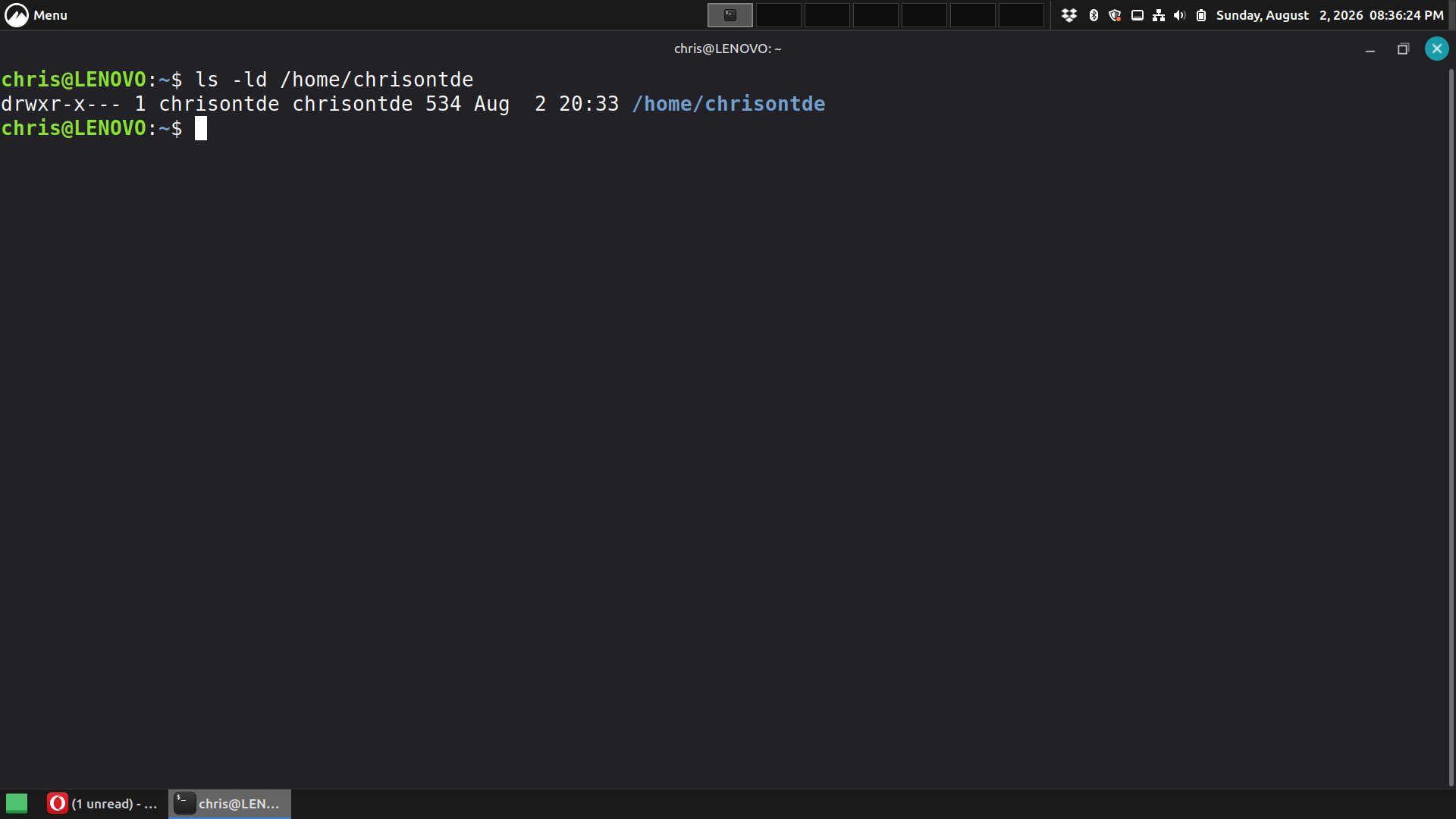
Two users. Apparently partition 5 was setup to be accessible only to user chris. If you check with ls -l/n you'll likely see only user 1000/chris and group 1000/chris has permissions enabled.
There are various ways to fix this; a sampling:
Adding chrisontde to group 1000/chris plus adding group write permission to /media/chris/DATA could be a start. I wouldn't do it quite that way. One way I might start would be by adding a fstab entry for partition 5 to mount it in /home/DATA to make it easier to get to. /media/ is intended for use of removable media, so not an ideal location for your nvme's partition 5. And it wouldn't be a full solution without knowing whether having two users is what you really want. If you really would rather have only one user, then I'd add a basic fstab entry, followed by giving that directory rwx permissions to your sole user. If you really want two separate users, I'd also symlink /home/DATA to both /home/chris and to /home/chrisontde, besides enabling both users full access via some shared group.
On 8/2/26 13:24, Felix Miata via tde-users wrote:
There are various ways to fix this; a sampling:
Adding chrisontde to group 1000/chris plus adding group write permission to /media/chris/DATA could be a start. I wouldn't do it quite that way. One way I might start would be by adding a fstab entry for partition 5 to mount it in /home/DATA to make it easier to get to. /media/ is intended for use of removable media, so not an ideal location for your nvme's partition 5. And it wouldn't be a full solution without knowing whether having two users is what you really want. If you really would rather have only one user, then I'd add a basic fstab entry, followed by giving that directory rwx permissions to your sole user. If you really want two separate users, I'd also symlink /home/DATA to both /home/chris and to /home/chrisontde, besides enabling both users full access via some shared group.
Well the reason that I have two users is because:
Chris - is my Cinnamon user account, the account i've been using since I installed Mint a few weeks ago.
I created CHRISTDE to see if I could get TDE to install. Which, I finally did. As you know, I tried installing TDE with DEBIAN 13
and just got dropped down to a black terminal screen.
OPEN SUS Leap, I forgot what happened.. I posted about it on here, a few weeks ago.
If I can get TDE set up, I can abandon the " chris" account... I just wouldn't be able to access the data partition if I had to log into Cinnamon.
IDK why Cinnamon Disk Manager gave the partition /data/ designation. I did everything via the Cinnamon Disk Manager GUI.
Thanks,
Chris
CHRMAR3@AOL.COM
---------------------------------------------------------
Currently Using: Linux Mint 22.3
CHRIS M composed on 2026-08-02 13:35 (UTC-0500):
If I can get TDE set up, I can abandon the " chris" account... I just wouldn't be able to access the data partition if I had to log into Cinnamon.
Just to get you by until you know you'll only need one user, the following is how I would get there (after backing up /etc/group; permission by chrisontde to existing partition 5 mount configuration), as I don't use any GUI tools for partitioning, and rarely touch GUI tools for altering users and groups:
sudo chmod 775 /media/chris/DATA sudo sed -i 's/chris:x:1000:/chris:x:1000:chrisontde/' /etc/group # IOW, append chrisontde to the line beginning with chris using any # plain text editor upon file /etc/group
The first assumes
# ls -ld /media/chris/DATA drwx------ ... /media/chris/DATA # full rwx permissions only to user chris
and grants full rwx access to /media/chris/DATA by group chrisontde in addition to user chris. It also assumes that the cinnamon configuration utility didn't include something that prevents this from working. I have no idea how it did what it did.
# ls -ld /media/chris/DATA drwxrwx--- ... /media/chris/DATA # full rwx permissions to both chris and members of group chrisontde
The second adds user chrisontde to group chris.
On Sunday, August 2, 2026 at 02:46:41 PM CDT, Felix Miata via tde-users users@trinitydesktop.org wrote:
CHRIS M composed on 2026-08-02 13:35 (UTC-0500):
If I can get TDE set up, I can abandon the " chris" account... I just wouldn't be able to access the data partition if I had to log into Cinnamon.
Just to get you by until you know you'll only need one user, the following is how I would get there (after backing up /etc/group; permission by chrisontde to existing partition 5 mount configuration), as I don't use any GUI tools for partitioning, and rarely touch GUI tools for altering users and groups:
sudo chmod 775 /media/chris/DATA sudo sed -i 's/chris:x:1000:/chris:x:1000:chrisontde/' /etc/group # IOW, append chrisontde to the line beginning with chris using any # plain text editor upon file /etc/group
The first assumes
# ls -ld /media/chris/DATA drwx------ ... /media/chris/DATA # full rwx permissions only to user chris
and grants full rwx access to /media/chris/DATA by group chrisontde in addition to user chris. It also assumes that the cinnamon configuration utility didn't include something that prevents this from working. I have no idea how it did what it did.
# ls -ld /media/chris/DATA drwxrwx--- ... /media/chris/DATA # full rwx permissions to both chris and members of group chrisontde
The second adds user chrisontde to group chris.
I ran all of those commands, logged out of Cinnamon, and logged into TDE. And now when I click on "DATA" it says the folder doesn't exist? Thanks,ChrisCHRMAR3@AOL.COM Update:I can still open the folder from the Cinnamon side, see attachment. Thanks,ChrisCHRMAR3@AOL.COM

CHRIS M composed on 2026-08-02 19:20 (UTC-0500):
I ran all of those commands, logged out of Cinnamon, and logged into TDE. And now when I click on "DATA" it says the folder doesn't exist?
Update:I can still open the folder from the Cinnamon side, see attachment.
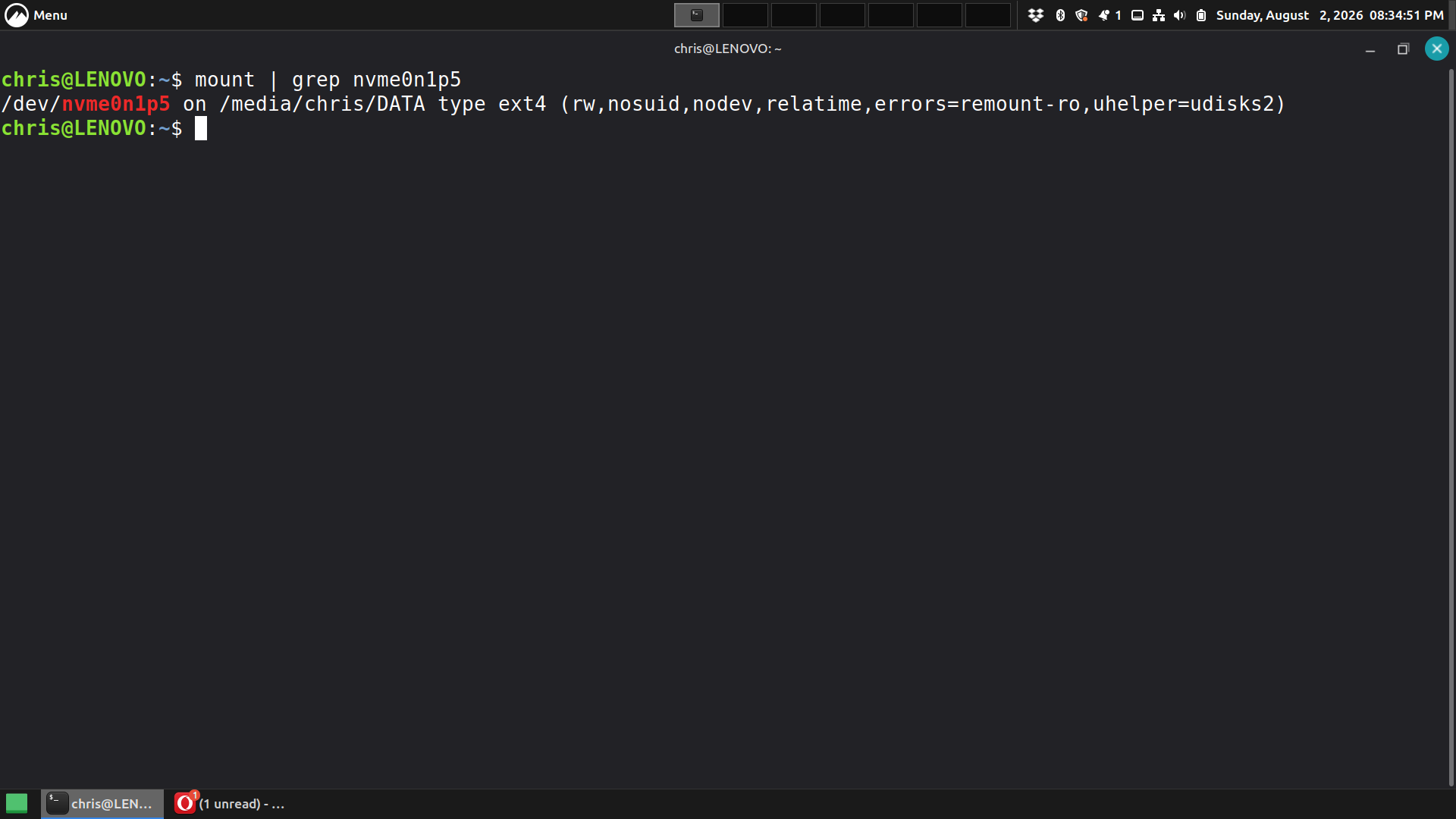
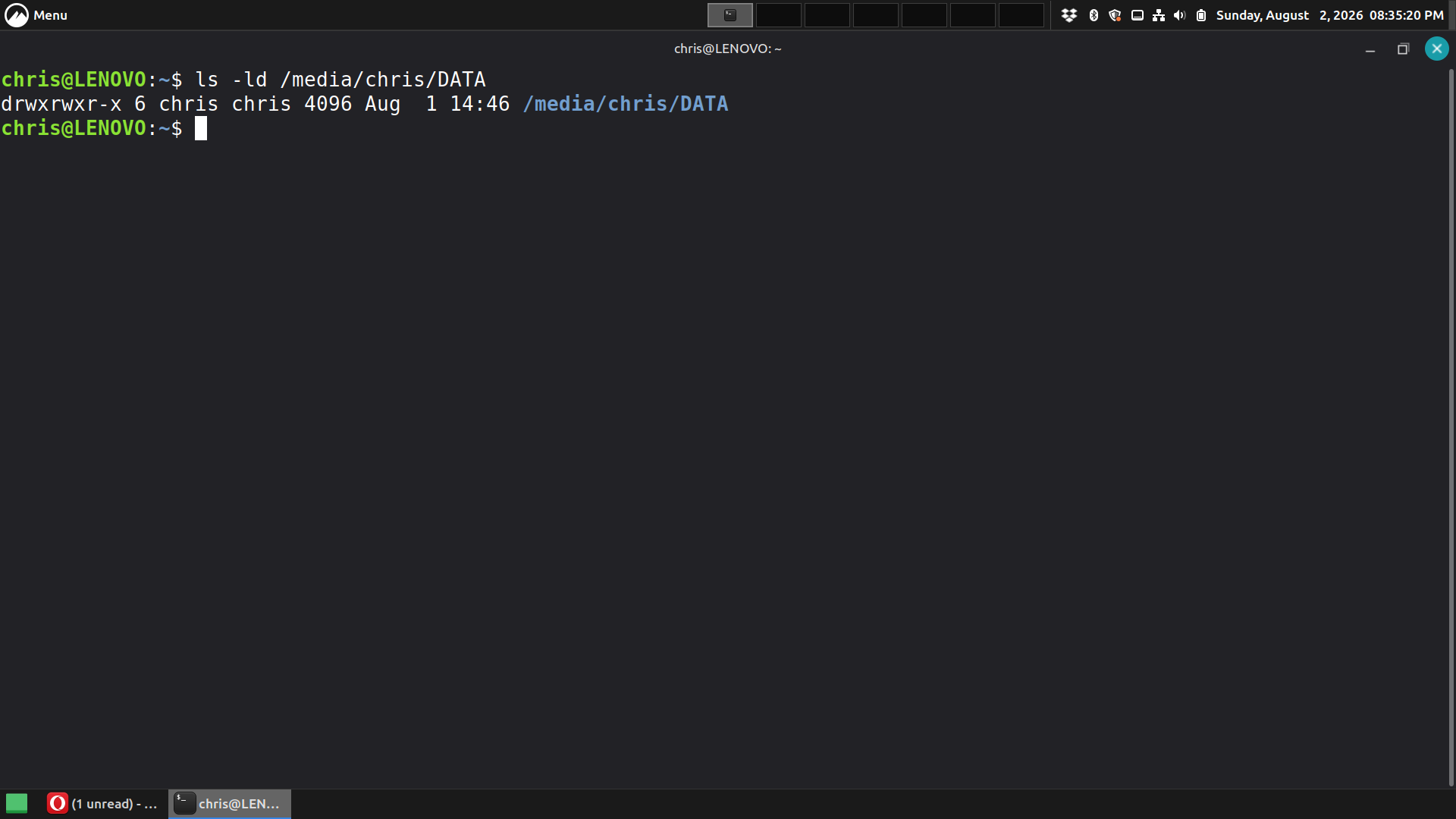
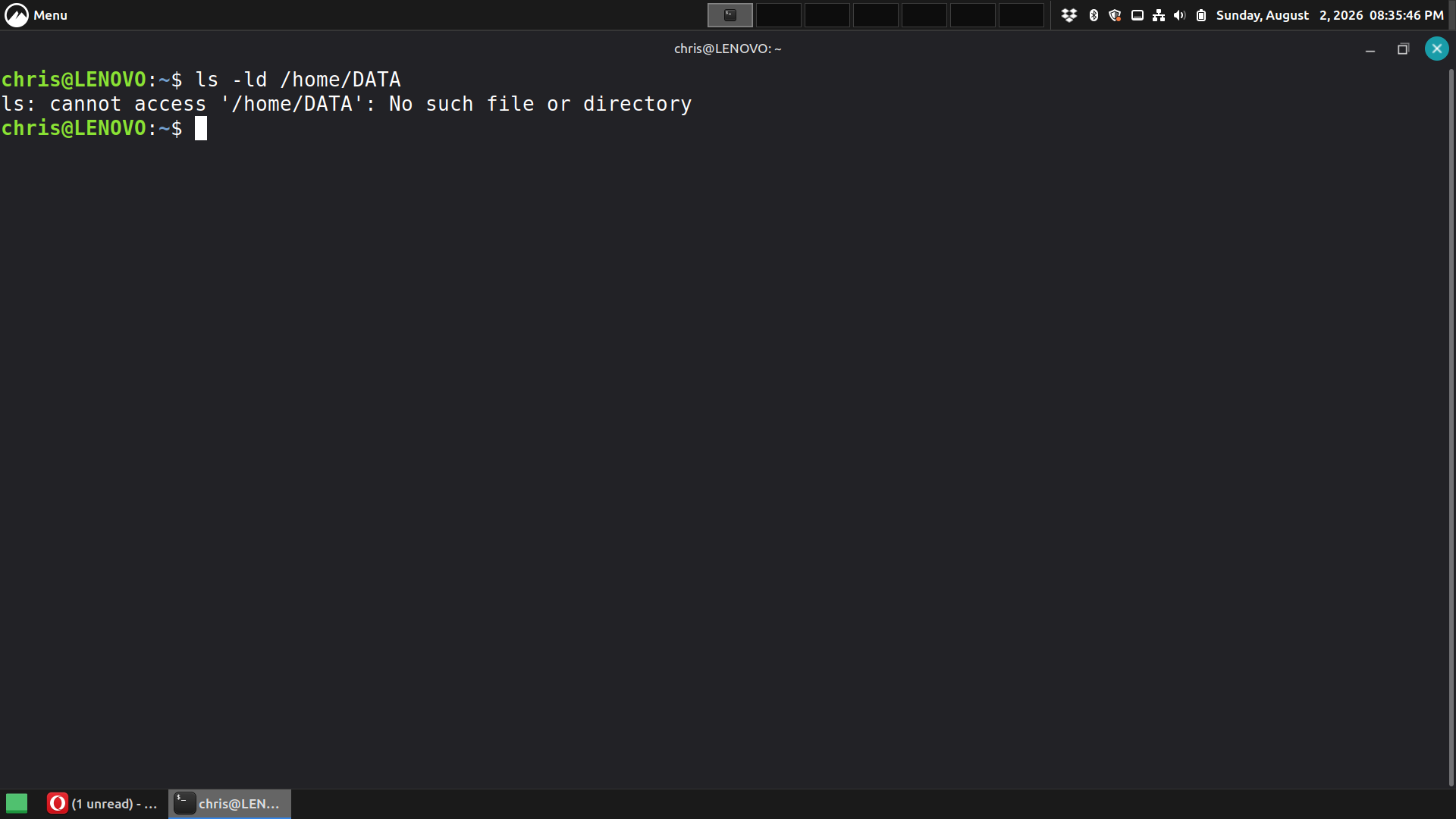
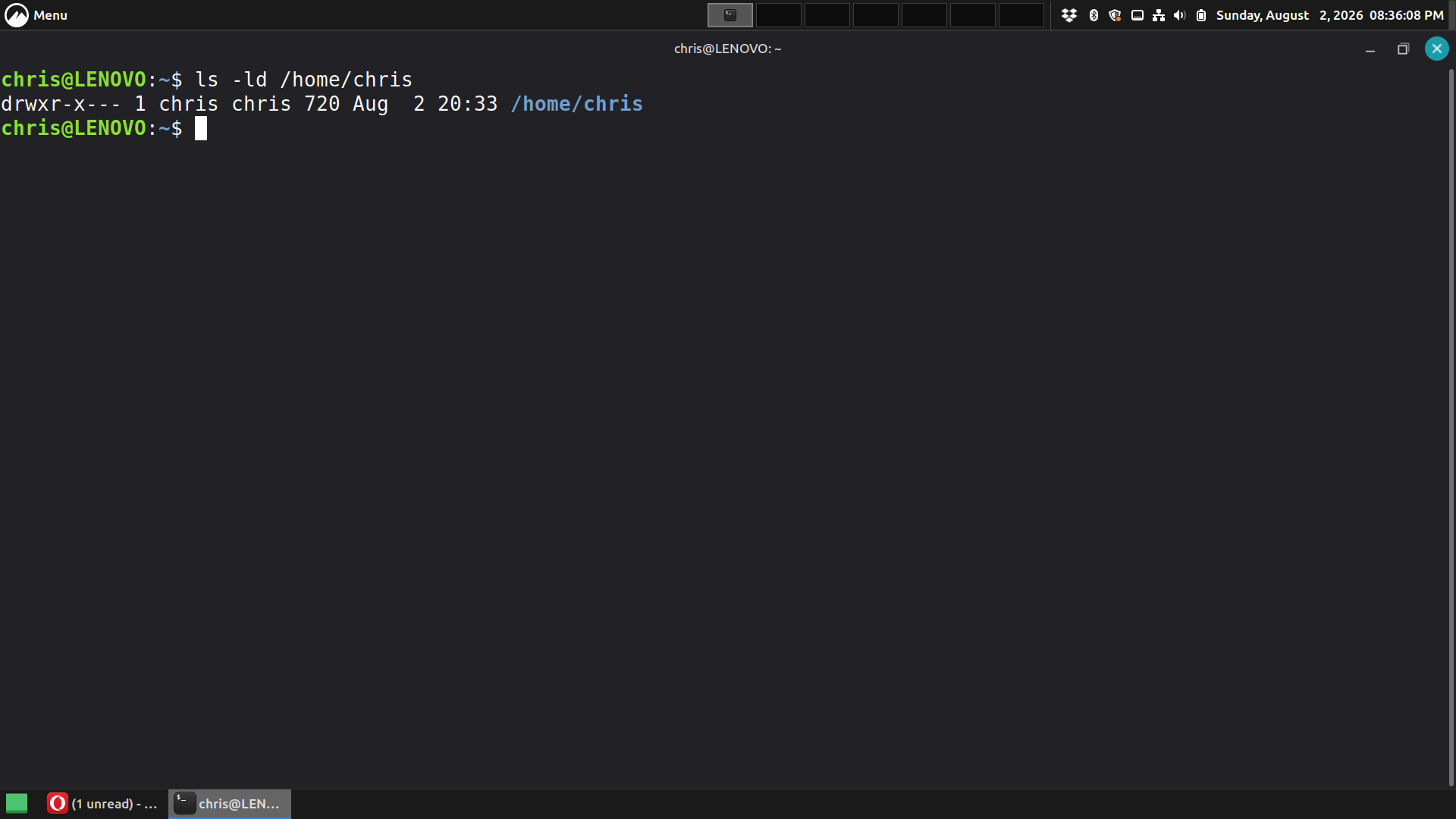
Logged into TDE, in Konsole, show output from (using sudo as necessary; or via Konsole's session menu, select to open a new root shell tab):
mount | grep nvme0n1p5 ls -ld /media/chris/DATA ls -ld /home/DATA ls -ld /home/chris ls -ld /home/chrisontde
Try all the same commands from a cinnamon session in whatever terminal it offers, to compare.
My bedtime is in 14 minutes.
On Sunday, August 2, 2026 at 08:17:00 PM CDT, Felix Miata via tde-users users@trinitydesktop.org wrote:
CHRIS M composed on 2026-08-02 19:20 (UTC-0500):
I ran all of those commands, logged out of Cinnamon, and logged into TDE. And now when I click on "DATA" it says the folder doesn't exist?
Update:I can still open the folder from the Cinnamon side, see attachment.
Logged into TDE, in Konsole, show output from (using sudo as necessary; or via Konsole's session menu, select to open a new root shell tab):
mount | grep nvme0n1p5 ls -ld /media/chris/DATA ls -ld /home/DATA ls -ld /home/chris ls -ld /home/chrisontde
Try all the same commands from a cinnamon session in whatever terminal it offers, to compare.
My bedtime is in 14 minutes.
CHRIS M composed on 2026-08-02 20:33 (UTC-0500):
chrisontde@LENOVO:~$ mount | grep nvme0n1p5 /dev/nvme0n1p5 on /media/chris/DATA type ext4 (rw,nosuid,nodev,relatime,errors=remount-ro,uhelper=udisks2)
chrisontde@LENOVO:~$ sudo ls -ld /media/chris /DATA[sudo] password for chrisontde:Sorry, user chrisontde is not allowed to execute '/usr/bin/ls -ld /media/chris/DATA' as root on LENOVO.chrisontde@LENOVO:~$
chrisontde@LENOVO:~$ ls -ld /home/DATA ls: cannot access '/home/DATA': No such file or directorychrisontde@LENOVO:~$
chrisontde@LENOVO:~$ ls -ld /home/chris drwxr-x--- 1 chris chris 720 Aug 2 19:16 /home/chrischrisontde@LENOVO:~$
chrisontde@LENOVO:~$ ls -ld /home/chrisontde drwxr-x--- 1 chrisontde chrisontde 618 Aug 2 20:28 /home/chrisontdechrisontde@LENOVO:~$
Apparently whatever cinnamon did to get nvme0n1p5 mounted to /media/chris/DATA is blocking the suggested workaround. I suggest to use cinnamon partition tool to undo whatever it did, and create a fstab entry that mounts it, e.g.:
sudo mkdir /home/data sudo chmod 770 /home/data sudo chown chris:chris /home/data (next: append to fstab:) LABEL=DATA /home/data ext4 relatime 0 2 (next: reboot) mount | grep nvme0n1p5 (should confirm DATA partition is mounted rw to /home/data) ls -ld /home/data (should produce drwxrwx--- chris chris permissions & ownership, plus access via file manager to /home/data whether logged into cinnamon or tde, if in /etc/group exists chris:x:1000:chrisontde)
On Sunday, August 2, 2026 at 09:07:28 PM CDT, Felix Miata via tde-users users@trinitydesktop.org wrote:
CHRIS M composed on 2026-08-02 20:33 (UTC-0500):
chrisontde@LENOVO:~$ mount | grep nvme0n1p5 /dev/nvme0n1p5 on /media/chris/DATA type ext4 (rw,nosuid,nodev,relatime,errors=remount-ro,uhelper=udisks2)
chrisontde@LENOVO:~$ sudo ls -ld /media/chris /DATA[sudo] password for chrisontde:Sorry, user chrisontde is not allowed to execute '/usr/bin/ls -ld /media/chris/DATA' as root on LENOVO.chrisontde@LENOVO:~$
chrisontde@LENOVO:~$ ls -ld /home/DATA ls: cannot access '/home/DATA': No such file or directorychrisontde@LENOVO:~$
chrisontde@LENOVO:~$ ls -ld /home/chris drwxr-x--- 1 chris chris 720 Aug 2 19:16 /home/chrischrisontde@LENOVO:~$
chrisontde@LENOVO:~$ ls -ld /home/chrisontde drwxr-x--- 1 chrisontde chrisontde 618 Aug 2 20:28 /home/chrisontdechrisontde@LENOVO:~$
Apparently whatever cinnamon did to get nvme0n1p5 mounted to /media/chris/DATA is blocking the suggested workaround. I suggest to use cinnamon partition tool to undo whatever it did, and create a fstab entry that mounts it, e.g.:
sudo mkdir /home/data sudo chmod 770 /home/data sudo chown chris:chris /home/data (next: append to fstab:) LABEL=DATA /home/data ext4 relatime 0 2 (next: reboot) mount | grep nvme0n1p5 (should confirm DATA partition is mounted rw to /home/data) ls -ld /home/data (should produce drwxrwx--- chris chris permissions & ownership, plus access via file manager to /home/data whether logged into cinnamon or tde, if in /etc/group exists chris:x:1000:chrisontde)
CHRIS M composed on 2026-08-02 20:33 (UTC-0500):
chrisontde@LENOVO:~$ mount | grep nvme0n1p5 /dev/nvme0n1p5 on /media/chris/DATA type ext4 (rw,nosuid,nodev,relatime,errors=remount-ro,uhelper=udisks2) chrisontde@LENOVO:~$ sudo ls -ld /media/chris /DATA[sudo] password for chrisontde:Sorry, user chrisontde is not allowed to execute '/usr/bin/ls -ld /media/chris/DATA' as root on LENOVO.chrisontde@LENOVO:~$ chrisontde@LENOVO:~$ ls -ld /home/DATA ls: cannot access '/home/DATA': No such file or directorychrisontde@LENOVO:~$ chrisontde@LENOVO:~$ ls -ld /home/chris drwxr-x--- 1 chris chris 720 Aug 2 19:16 /home/chrischrisontde@LENOVO:~$ chrisontde@LENOVO:~$ ls -ld /home/chrisontde drwxr-x--- 1 chrisontde chrisontde 618 Aug 2 20:28 /home/chrisontdechrisontde@LENOVO:~$
Apparently whatever cinnamon did to get nvme0n1p5 mounted to /media/chris/DATA is blocking the suggested workaround. I suggest to use cinnamon partition tool to undo whatever it did, and create a fstab entry that mounts it, e.g.:
sudo mkdir /home/data sudo chmod 770 /home/data sudo chown chris:chris /home/data (next: append to fstab:) LABEL=DATA /home/data ext4 relatime 0 2 (next: reboot) mount | grep nvme0n1p5 (should confirm DATA partition is mounted rw to /home/data) ls -ld /home/data (should produce drwxrwx--- chris chris permissions & ownership, plus access via file manager to /home/data whether logged into cinnamon or tde, if in /etc/group exists chris:x:1000:chrisontde)
On Sunday, August 2, 2026 at 09:07:43 PM CDT, Felix Miata via tde-users users@trinitydesktop.org wrote:
CHRIS M composed on 2026-08-02 20:33 (UTC-0500):
chrisontde@LENOVO:~$ mount | grep nvme0n1p5 /dev/nvme0n1p5 on /media/chris/DATA type ext4 (rw,nosuid,nodev,relatime,errors=remount-ro,uhelper=udisks2) chrisontde@LENOVO:~$ sudo ls -ld /media/chris /DATA[sudo] password for chrisontde:Sorry, user chrisontde is not allowed to execute '/usr/bin/ls -ld /media/chris/DATA' as root on LENOVO.chrisontde@LENOVO:~$ chrisontde@LENOVO:~$ ls -ld /home/DATA ls: cannot access '/home/DATA': No such file or directorychrisontde@LENOVO:~$ chrisontde@LENOVO:~$ ls -ld /home/chris drwxr-x--- 1 chris chris 720 Aug 2 19:16 /home/chrischrisontde@LENOVO:~$ chrisontde@LENOVO:~$ ls -ld /home/chrisontde drwxr-x--- 1 chrisontde chrisontde 618 Aug 2 20:28 /home/chrisontdechrisontde@LENOVO:~$
Apparently whatever cinnamon did to get nvme0n1p5 mounted to /media/chris/DATA is blocking the suggested workaround. I suggest to use cinnamon partition tool to undo whatever it did, and create a fstab entry that mounts it, e.g.:
sudo mkdir /home/data sudo chmod 770 /home/data sudo chown chris:chris /home/data (next: append to fstab:) LABEL=DATA /home/data ext4 relatime 0 2 (next: reboot) mount | grep nvme0n1p5 (should confirm DATA partition is mounted rw to /home/data) ls -ld /home/data (should produce drwxrwx--- chris chris permissions & ownership, plus access via file manager to /home/data whether logged into cinnamon or tde, if in /etc/group exists chris:x:1000:chrisontde)

On Sunday, August 2, 2026 at 09:07:43 PM CDT, Felix Miata via tde-users users@trinitydesktop.org wrote:
CHRIS M composed on 2026-08-02 20:33 (UTC-0500):
chrisontde@LENOVO:~$ mount | grep nvme0n1p5 /dev/nvme0n1p5 on /media/chris/DATA type ext4 (rw,nosuid,nodev,relatime,errors=remount-ro,uhelper=udisks2) chrisontde@LENOVO:~$ sudo ls -ld /media/chris /DATA[sudo] password for chrisontde:Sorry, user chrisontde is not allowed to execute '/usr/bin/ls -ld /media/chris/DATA' as root on LENOVO.chrisontde@LENOVO:~$ chrisontde@LENOVO:~$ ls -ld /home/DATA ls: cannot access '/home/DATA': No such file or directorychrisontde@LENOVO:~$ chrisontde@LENOVO:~$ ls -ld /home/chris drwxr-x--- 1 chris chris 720 Aug 2 19:16 /home/chrischrisontde@LENOVO:~$ chrisontde@LENOVO:~$ ls -ld /home/chrisontde drwxr-x--- 1 chrisontde chrisontde 618 Aug 2 20:28 /home/chrisontdechrisontde@LENOVO:~$
Apparently whatever cinnamon did to get nvme0n1p5 mounted to /media/chris/DATA is blocking the suggested workaround. I suggest to use cinnamon partition tool to undo whatever it did, and create a fstab entry that mounts it, e.g.:
sudo mkdir /home/data sudo chmod 770 /home/data sudo chown chris:chris /home/data (next: append to fstab:) LABEL=DATA /home/data ext4 relatime 0 2 (next: reboot) mount | grep nvme0n1p5 (should confirm DATA partition is mounted rw to /home/data) ls -ld /home/data (should produce drwxrwx--- chris chris permissions & ownership, plus access via file manager to /home/data whether logged into cinnamon or tde, if in /etc/group exists chris:x:1000:chrisontde)

It's funny, I can log into Cinnamon and the files are still there. So its come down to either: 1. Nuke the OS, nuke the partition and set the partition back up under TDE 2. same as above, but not set up a partition ( Makes downloading dropbox files a pain ) 3. Or give up trying to use TDE. Thanks,ChrisCHRMAR3@AOL.COM

Anno domini 10:45:22 Mon, 3 Aug 2026 +0000 (UTC) CHRIS M via tde-users scripsit:
It's funny, I can log into Cinnamon and the files are still there. So its come down to either:
- Nuke the OS, nuke the partition and set the partition back up under TDE
- same as above, but not set up a partition ( Makes downloading dropbox files a pain )
- Or give up trying to use TDE.
Thanks,ChrisCHRMAR3@AOL.COM
I think you have a misconception on how your OS works. Most likely your two user accounts have different uids and different main groups. Your data folder most likly is owned by user1:group1 with rxw------ permissions, so user2:group2 cannot read nor write to that directory.
You might want to check these and post the result: # groups user1 # groups user2 # ls -ld data_directory
Nik
Dr. Nikolaus Klepp composed on 2026-08-03 13:42 (UTC+0200):
I think you have a misconception on how your OS works. Most likely your two user accounts have different uids and different main groups. Your data folder most likly is owned by user1:group1 with rxw------ permissions, so user2:group2 cannot read nor write to that directory.
We already know from https://mail.trinitydesktop.org/mailman3/hyperkitty/list/users@trinitydesktop.org/message/JRQNYMOUW5PC5RXJXAZ3245OLVAZV2XR/ for user1 = chris = 1000:1000 drwxr-x--- for user2 = chrisontde = 1001:1001 drwxr-x---
You might want to check these and post the result: # groups user1 # groups user2 # ls -ld data_directory
Thanks,ChrisCHRMAR3@AOL.COM
On Monday, August 3, 2026 at 07:06:21 AM CDT, Felix Miata via tde-users users@trinitydesktop.org wrote:
Dr. Nikolaus Klepp composed on 2026-08-03 13:42 (UTC+0200):
I think you have a misconception on how your OS works. Most likely your two user accounts have different uids and different main groups. Your data folder most likly is owned by user1:group1 with rxw------ permissions, so user2:group2 cannot read nor write to that directory.
We already know from https://mail.trinitydesktop.org/mailman3/hyperkitty/list/users@trinitydesktop.org/message/JRQNYMOUW5PC5RXJXAZ3245OLVAZV2XR/ for user1 = chris = 1000:1000 drwxr-x--- for user2 = chrisontde = 1001:1001 drwxr-x---
You might want to check these and post the result: # groups user1 # groups user2 # ls -ld data_directory
Thanks,ChrisCHRMAR3@AOL.COM
On Monday, August 3, 2026 at 06:43:15 AM CDT, Dr. Nikolaus Klepp via tde-users users@trinitydesktop.org wrote:
Anno domini 10:45:22 Mon, 3 Aug 2026 +0000 (UTC) CHRIS M via tde-users scripsit:
It's funny, I can log into Cinnamon and the files are still there. So its come down to either:
- Nuke the OS, nuke the partition and set the partition back up under TDE
- same as above, but not set up a partition ( Makes downloading dropbox files a pain )
- Or give up trying to use TDE.
Thanks,ChrisCHRMAR3@AOL.COM
I think you have a misconception on how your OS works. Most likely your two user accounts have different uids and different main groups. Your data folder most likly is owned by user1:group1 with rxw------ permissions, so user2:group2 cannot read nor write to that directory.
You might want to check these and post the result: # groups user1 # groups user2 # ls -ld data_directory
Nik
CHRIS M composed on 2026-08-02 22:05 (UTC-0500):
ell, the drive is working, but as you see, dropbox has a lock on it and when you click on it, you get an error. ( See attachment ) I had to install dropbox CLI to get dropbox to work, since there is no app indicator for TDE, and its putting my data folder in /home instead of on /data the only way to move my data folder is with the gui, Google says, which does not work in TDE, due to no app indicator. I wonder if logging into Cinnamon, and using the GUI there would move the folder to /data, then log out and back into TDE?
Here again you show no information that includes owner/group or permissions. The problem most likely is the dropbox folder was created with permissions limited to user 1000/chris, and needs changing via a chmod 770 command. Why it shows in the temp directory labeled "media" I can't answer, but as I already noted, the /media/ directory is intended for removable media, not internal storage, such as nvme.
Dunno why you'd want to make your data partition two levels away from your home, which is what /data amounts to, instead of one, in /home/data. Nevertheless you can make it easier yet by symlinking its location directly into both /home/chris and /home/chrisontde. First the permissions blockage needs to be eradicated.
CHRIS M composed on 2026-08-02 22:05 (UTC-0500):
ell, the drive is working, but as you see, dropbox has a lock on it and when you click on it, you get an error. ( See attachment ) I had to install dropbox CLI to get dropbox to work, since there is no app indicator for TDE, and its putting my data folder in /home instead of on /data the only way to move my data folder is with the gui, Google says, which does not work in TDE, due to no app indicator. I wonder if logging into Cinnamon, and using the GUI there would move the folder to /data, then log out and back into TDE?
Here again you show no information that includes owner/group or permissions. The problem most likely is the dropbox folder was created with permissions limited to user 1000/chris, and needs changing via a chmod 770 command. Why it shows in the temp directory labeled "media" I can't answer, but as I already noted, the /media/ directory is intended for removable media, not internal storage, such as nvme.
Dunno why you'd want to make your data partition two levels away from your home, which is what /data amounts to, instead of one, in /home/data. Nevertheless you can make it easier yet by symlinking its location directly into both /home/chris and /home/chrisontde. First the permissions blockage needs to be eradicated.
CHRIS M composed on 2026-08-02 21:43 (UTC-0500):
See attachment.
Those screenshots provide nearly zero useful information. Icons tell us virtually nothing If you must show screenshots, change the view mode to "Detailed List View" first. Better than screenshots are command input/output copied and pasted, in part because they don't require jumping back and forth between email and image viewer in trying to respond.
On Sunday, August 2, 2026 at 08:17:00 PM CDT, Felix Miata via tde-users users@trinitydesktop.org wrote:
CHRIS M composed on 2026-08-02 19:20 (UTC-0500):
I ran all of those commands, logged out of Cinnamon, and logged into TDE. And now when I click on "DATA" it says the folder doesn't exist?
Update:I can still open the folder from the Cinnamon side, see attachment.
Logged into TDE, in Konsole, show output from (using sudo as necessary; or via Konsole's session menu, select to open a new root shell tab):
mount | grep nvme0n1p5 ls -ld /media/chris/DATA ls -ld /home/DATA ls -ld /home/chris ls -ld /home/chrisontde
Try all the same commands from a cinnamon session in whatever terminal it offers, to compare.
My bedtime is in 14 minutes.
CHRIS M composed on 2026-08-02 19:20 (UTC-0500):
I ran all of those commands, logged out of Cinnamon, and logged into TDE. And now when I click on "DATA" it says the folder doesn't exist?
Update:I can still open the folder from the Cinnamon side, see attachment.
Logged into TDE, in Konsole, show output from (using sudo as necessary; or via Konsole's session menu, select to open a new root shell tab):
mount | grep nvme0n1p5 ls -ld /media/chris/DATA ls -ld /home/DATA ls -ld /home/chris ls -ld /home/chrisontde
Try all the same commands from a cinnamon session in whatever terminal it offers, to compare.
My bedtime is in 14 minutes.
-
 CHRIS M
 -
CHRIS M
-
 Dr. Nikolaus Klepp
 -
 Felix Miata
 -
 Thierry de Coulon